When I first built Clipboard History for elementary OS, I never expected it to grow beyond a simple personal tool. But here we are — version 1.4 is now live, and it’s packed with improvements that make the app faster, more reliable, and genuinely useful for daily work.
This update isn’t just about adding features. It’s about fixing the small annoyances that make a tool either delightful or frustrating to use.
New Features in Version 1.4
Pin Items — Finally!
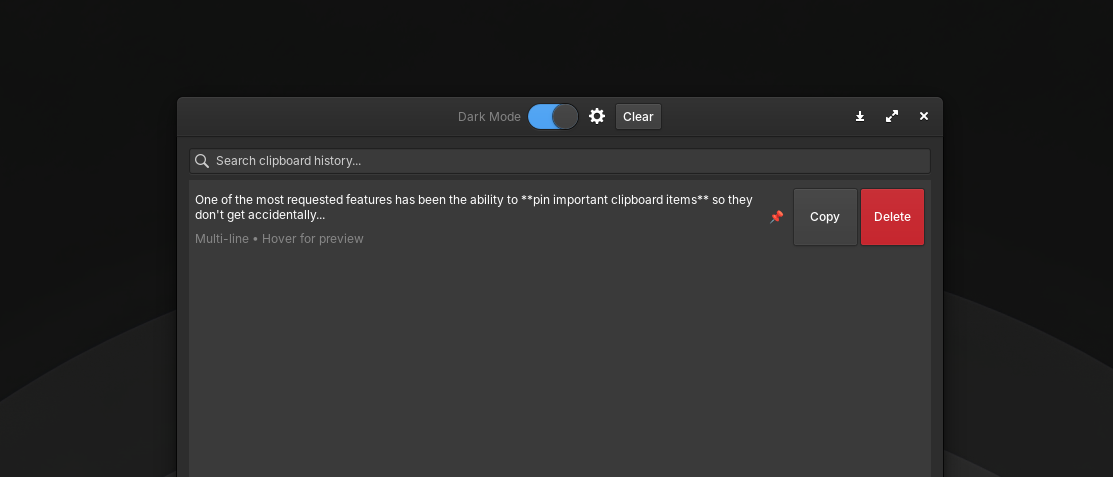
One of the most requested features has been the ability to pin important clipboard items so they don’t get accidentally deleted.
Here’s how it works:
- Click the 📌 button on any history item to pin it
- Pinned items are protected from:
- Clear All — they stay even when you clear the history
- Auto-trim — when the history reaches the maximum limit, pinned items are preserved
- The pinned state persists even after restarting the app
Persistence is handled through JSON format:
{"text": "Important command here", "pinned": true}
Legacy data (array of strings) is automatically migrated to the new format — no data loss.
Double-Click to Copy
A small but significant quality-of-life improvement: double-click any history item to instantly copy it back to your clipboard. A “Copied!” feedback appears on the Copy button to confirm the action.
Background Monitoring
This is a game-changer.
Previously, closing the window would exit the application entirely — stopping clipboard monitoring. Now, the app continues to run in the background, silently watching your clipboard.
To reopen the window, simply run clipboard-history again. The existing instance will bring the window back to the foreground.
Ctrl+Q to Quit
Want to completely exit the application? Use Ctrl+Q. This closes the window and terminates the background process.
Under the Hood: What Got Fixed
Version 1.4 isn’t just about new features. A significant portion of this release focused on fixing bugs and improving reliability.
Wayland Compatibility
Wayland has become the default display server on many Linux distributions, and it introduced some challenges. Key fixes include:
- Polling fallback (400ms) — clipboard detection now works with apps like Electron, Chromium, and Wayland-native applications
- Null check for
Gdk.Screen.get_default()— prevents crashes on Wayland where the screen might return null
Smarter Disk I/O
Writing to disk on every clipboard change was inefficient and could cause performance issues. Now, changes are debounced with a 500ms timer — reducing disk writes and improving overall responsiveness.
Build and Packaging Improvements
- Dev script now includes separate menu options for Build (
meson setup), Compile (meson compile), and Install (sudo ninja install) - Deb package now includes the missing
libjson-glib-1.0-0dependency .gitignorehas been updated to exclude generated files from version control
License Consistency
The README mentioned MIT, but the About dialog used GPL-3.0. This has been fixed — the license is now consistent across all documentation.
Full Changelog
Version 1.4.2
- Double-click on any history item to automatically copy it to clipboard (feedback “Copied!” appears on the Copy button)
Version 1.4.1
New Features:
- Pin/unpin clipboard items — pinned items are protected from Clear All and auto-trim
- Pin button (📌) on each history item row
- Pinned state persists in JSON format
- Auto-migration from legacy JSON format
Bug Fixes:
clear_all()now only removes non-pinned itemsmax_itemstrim skips pinned items- Remove pin automatically when item is deleted
Version 1.4.0
New Features:
- Clipboard monitoring keeps running even when window is closed
- Re-open window by running
clipboard-historyagain - Debounced JSON persistence (500ms debounce — reduces disk writes)
- Ctrl+Q shortcut to quit application completely
Bug Fixes:
- Fix clipboard not detected from some apps by adding polling fallback
- Fix app exiting completely when window is closed
- Fix
save_history()writing to disk on every clipboard change - Fix license mismatch
- Fix missing dependency in deb package control file
- Fix Wayland-related crashes
What’s Next?
With version 1.4 stable and reliable, I’m already planning the next steps:
- Wingpanel integration — quick access from the top panel
- Global keyboard shortcut — instant popup like Win + V on Windows
- Image support — store and retrieve images from clipboard
- Favorite items — pin your most-used clipboard entries
Try It Yourself
Clipboard History is open source and available on GitHub. Whether you’re an elementary OS user or just curious about how Linux apps are built, feel free to explore:
- Source code: github.com/gylangsatria/clipboard-history-elementary
- Download .deb: Available on the releases page
Final Thoughts
Building Clipboard History has been an incredible learning experience. I started this project as someone who isn’t a professional developer, and with each version, I learn something new — about Vala, GTK, packaging, and user experience.
Version 1.4 is proof that even a small tool can be polished into something genuinely useful. If you use it, I hope it makes your daily workflow just a little bit easier.
Stay curious. Stay tinkering.