A few days ago, I experienced one of the strangest issues I’ve ever encountered while using GitHub Pages.
Without making any changes to my repository, website, or DNS configuration, my personal blog suddenly became inaccessible and displayed a 404 page.
At first glance, it looked like a typical GitHub Pages deployment problem.
However, the actual root cause turned out to be something I never expected.
Everything Was Working… Until It Wasn’t
The website had been running normally for weeks.
There were no recent changes to the GitHub Pages configuration, no DNS modifications, and no Jekyll errors.
When I opened the GitHub Pages settings, everything appeared perfectly normal:
- GitHub Pages was still enabled.
- The deployment source was still set to the
mainbranch. - The latest deployment showed as successful.
- My custom domain was still configured correctly.
Yet visiting either my custom domain or gylangsatria.github.io only displayed:
There isn’t a GitHub Pages site here.
At first, I assumed the issue was related to GitHub Pages itself.
The Investigation Begins
Like most developers would do, I started checking everything one by one.
First, I verified my DNS records and confirmed that my custom domain still pointed to GitHub correctly.
Next, I inspected my repository. Everything was still there:
CNAME_config.ymlindex.md- Jekyll layouts
- GitHub Pages configuration
Nothing had changed.
I even created new commits and pushed them to GitHub in an attempt to trigger a fresh deployment. Unfortunately, nothing happened.
A Very Strange GitHub Actions Behavior
The next clue appeared in the GitHub Actions page.
Instead of starting a deployment, the internal GitHub Pages workflow remained in the Queued state indefinitely.
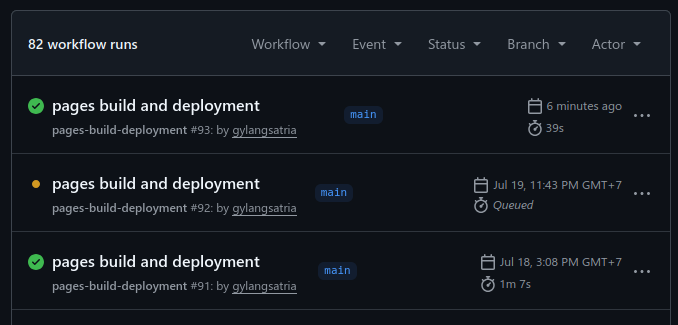
Even stranger, it never actually started running.
Trying to cancel the workflow produced another unexpected error:
Failed to cancel workflow.
Since GitHub Pages uses GitHub-hosted runners internally, this behavior immediately felt unusual.
Normally, deployments either succeed or fail. Remaining queued forever without being cancellable is not normal behavior.
Then I Discovered Something Even Stranger
While testing the website, I opened GitHub in an Incognito window.
Instead of seeing my public profile, I received another 404 page.
My profile itself was inaccessible to users who were not logged in.
That was the moment I realized the problem was probably much bigger than GitHub Pages.
The Real Cause
After contacting GitHub Support, they identified the actual issue.
One of the email addresses associated with my GitHub account, [email protected], had been flagged by GitHub’s internal systems.
As long as that email address remained attached to my account, GitHub could not complete the review process for my account.
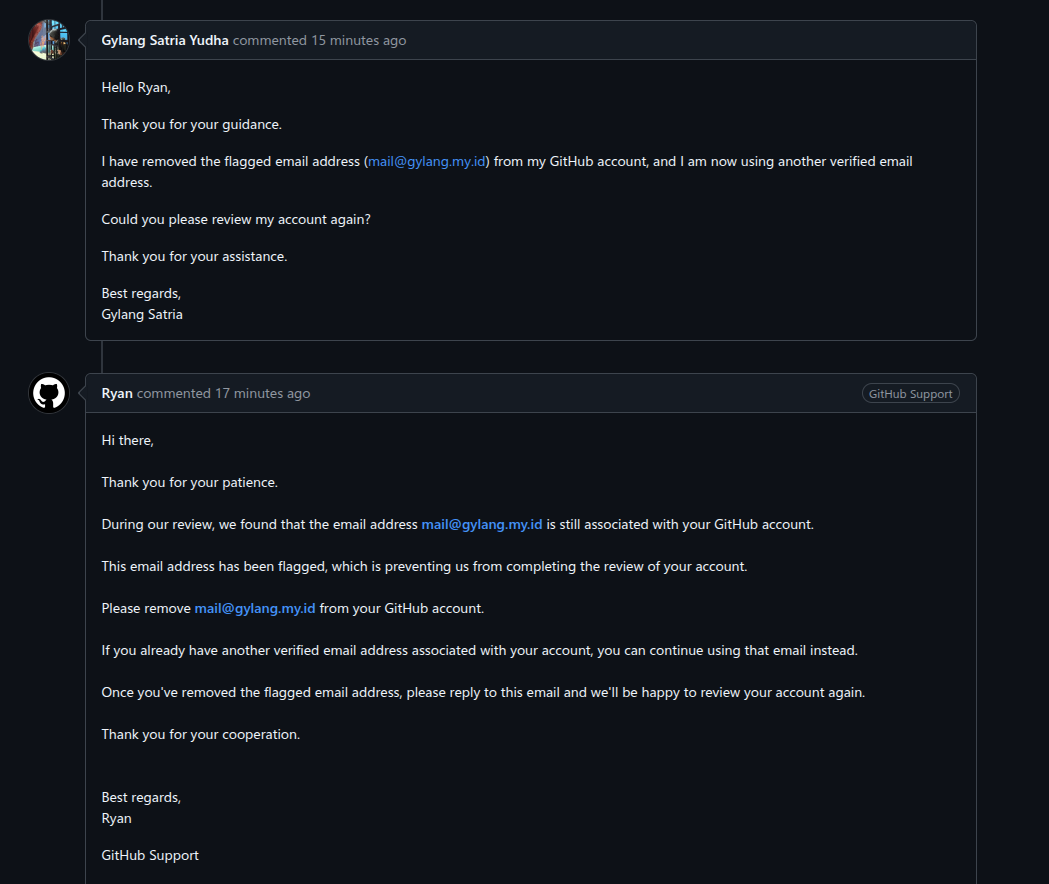
GitHub Support instructed me to:
- Remove the flagged email address from my GitHub account.
- Keep using another verified email address.
- Reply after removing the email so they could review my account again.
After removing the email address, I replied to the support ticket.
Not long afterward, GitHub responded that the restriction on my account had been removed.
Everything Immediately Returned to Normal
Once the restriction was lifted, everything started working again:
- My public GitHub profile became accessible.
- Public repositories appeared normally.
- GitHub Pages started serving my website again.
- New GitHub Pages deployments worked without any issues.
To ensure everything was rebuilt correctly, I created an empty commit simply to trigger another deployment:
git commit --allow-empty -m "chore: trigger GitHub Pages deployment after account restoration"
git push
A new deployment started immediately, completed successfully, and my website came back online.
What I Learned
This experience reminded me that not every GitHub Pages issue is actually caused by GitHub Pages.
When a website suddenly returns a 404 error, it’s natural to investigate DNS records, Jekyll configuration, repository settings, or deployment logs.
However, in my case, none of those were responsible.
The real problem existed at the account level.
A single flagged email address associated with my GitHub account caused a chain reaction that affected:
- My public GitHub profile.
- Public repositories.
- GitHub Pages.
- GitHub Pages deployments.
It was certainly not the first thing I would have suspected.
Final Thoughts
If your GitHub Pages website suddenly returns a 404 error even though nothing has changed, don’t stop your investigation at DNS or deployment logs.
Also verify whether your GitHub account itself is functioning normally.
Try opening your public profile from an Incognito window or another browser.
If your profile unexpectedly returns a 404 page while you’re still able to log into GitHub, there’s a possibility the issue is related to your account rather than your repository.
Sometimes, the smallest detail — such as a single email address associated with your account — can have a much larger impact than you would ever expect.