<?xml version="1.0" encoding="utf-8"?><feed xmlns="http://www.w3.org/2005/Atom" ><generator uri="https://jekyllrb.com/" version="3.10.0">Jekyll</generator><link href="https://blog.gylang.my.id/feed.xml" rel="self" type="application/atom+xml" /><link href="https://blog.gylang.my.id/" rel="alternate" type="text/html" /><updated>2026-07-06T16:09:54+00:00</updated><id>https://blog.gylang.my.id/feed.xml</id><title type="html">Gylang’s Blog</title><subtitle>A personal blog documenting experiments, breakdowns, and lessons learned the hard way.</subtitle><author><name>Gylang Satria</name></author><entry><title type="html">Clipboard History v1.4: Smarter, Faster, and More Reliable Than Ever</title><link href="https://blog.gylang.my.id/2026/07/06/clipboard-history-v14-smarter-faster-more-reliable.html" rel="alternate" type="text/html" title="Clipboard History v1.4: Smarter, Faster, and More Reliable Than Ever" /><published>2026-07-06T00:00:00+00:00</published><updated>2026-07-06T00:00:00+00:00</updated><id>https://blog.gylang.my.id/2026/07/06/clipboard-history-v14-smarter-faster-more-reliable</id><content type="html" xml:base="https://blog.gylang.my.id/2026/07/06/clipboard-history-v14-smarter-faster-more-reliable.html"><![CDATA[<p>When I first built Clipboard History for elementary OS, I never expected it to grow beyond a simple personal tool. But here we are — version 1.4 is now live, and it’s packed with improvements that make the app faster, more reliable, and genuinely useful for daily work.</p>

<p>This update isn’t just about adding features. It’s about fixing the small annoyances that make a tool either delightful or frustrating to use.</p>

<hr />

<h2 id="new-features-in-version-14">New Features in Version 1.4</h2>

<h3 id="pin-items--finally">Pin Items — Finally!</h3>

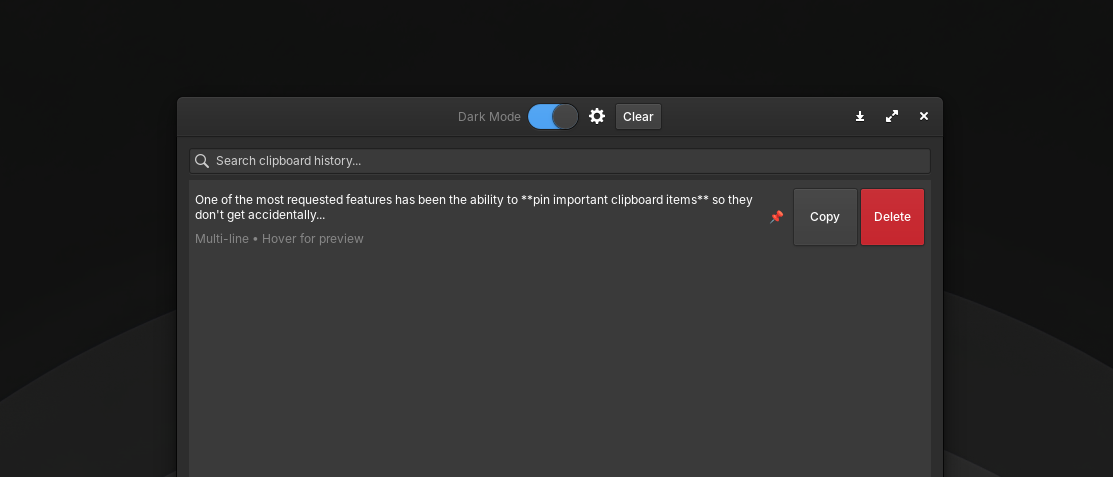
<p>One of the most requested features has been the ability to <strong>pin important clipboard items</strong> so they don’t get accidentally deleted.</p>

<p>Here’s how it works:</p>

<ul>
  <li>Click the 📌 button on any history item to pin it</li>
  <li>Pinned items are protected from:
    <ul>
      <li><strong>Clear All</strong> — they stay even when you clear the history</li>
      <li><strong>Auto-trim</strong> — when the history reaches the maximum limit, pinned items are preserved</li>
    </ul>
  </li>
  <li>The pinned state persists even after restarting the app</li>
</ul>

<p><img src="/assets/2026-07-06_11-10-clipboard-history.png" alt="Screenshot App" /></p>

<p>Persistence is handled through JSON format:</p>

<pre><code class="language-json">{"text": "Important command here", "pinned": true}
</code></pre>

<p>Legacy data (array of strings) is automatically migrated to the new format — no data loss.</p>

<h3 id="double-click-to-copy">Double-Click to Copy</h3>

<p>A small but significant quality-of-life improvement: double-click any history item to instantly copy it back to your clipboard. A “Copied!” feedback appears on the Copy button to confirm the action.</p>

<h3 id="background-monitoring">Background Monitoring</h3>

<p>This is a game-changer.</p>

<p>Previously, closing the window would exit the application entirely — stopping clipboard monitoring. Now, the app continues to run in the background, silently watching your clipboard.</p>

<p>To reopen the window, simply run <code>clipboard-history</code> again. The existing instance will bring the window back to the foreground.</p>

<h3 id="ctrlq-to-quit">Ctrl+Q to Quit</h3>

<p>Want to completely exit the application? Use <strong>Ctrl+Q</strong>. This closes the window <em>and</em> terminates the background process.</p>

<hr />

<h2 id="under-the-hood-what-got-fixed">Under the Hood: What Got Fixed</h2>

<p>Version 1.4 isn’t just about new features. A significant portion of this release focused on fixing bugs and improving reliability.</p>

<h3 id="wayland-compatibility">Wayland Compatibility</h3>

<p>Wayland has become the default display server on many Linux distributions, and it introduced some challenges. Key fixes include:</p>

<ul>
  <li><strong>Polling fallback (400ms)</strong> — clipboard detection now works with apps like Electron, Chromium, and Wayland-native applications</li>
  <li><strong>Null check for <code>Gdk.Screen.get_default()</code></strong> — prevents crashes on Wayland where the screen might return null</li>
</ul>

<h3 id="smarter-disk-io">Smarter Disk I/O</h3>

<p>Writing to disk on every clipboard change was inefficient and could cause performance issues. Now, changes are <strong>debounced with a 500ms timer</strong> — reducing disk writes and improving overall responsiveness.</p>

<h3 id="build-and-packaging-improvements">Build and Packaging Improvements</h3>

<ul>
  <li>Dev script now includes separate menu options for <strong>Build</strong> (<code>meson setup</code>), <strong>Compile</strong> (<code>meson compile</code>), and <strong>Install</strong> (<code>sudo ninja install</code>)</li>
  <li>Deb package now includes the missing <code>libjson-glib-1.0-0</code> dependency</li>
  <li><code>.gitignore</code> has been updated to exclude generated files from version control</li>
</ul>

<h3 id="license-consistency">License Consistency</h3>

<p>The README mentioned MIT, but the About dialog used GPL-3.0. This has been fixed — the license is now consistent across all documentation.</p>

<hr />

<h2 id="full-changelog">Full Changelog</h2>

<h3 id="version-142">Version 1.4.2</h3>

<ul>
  <li>Double-click on any history item to automatically copy it to clipboard (feedback “Copied!” appears on the Copy button)</li>
</ul>

<h3 id="version-141">Version 1.4.1</h3>

<p><strong>New Features:</strong></p>

<ul>
  <li>Pin/unpin clipboard items — pinned items are protected from Clear All and auto-trim</li>
  <li>Pin button (📌) on each history item row</li>
  <li>Pinned state persists in JSON format</li>
  <li>Auto-migration from legacy JSON format</li>
</ul>

<p><strong>Bug Fixes:</strong></p>

<ul>
  <li><code>clear_all()</code> now only removes non-pinned items</li>
  <li><code>max_items</code> trim skips pinned items</li>
  <li>Remove pin automatically when item is deleted</li>
</ul>

<h3 id="version-140">Version 1.4.0</h3>

<p><strong>New Features:</strong></p>

<ul>
  <li>Clipboard monitoring keeps running even when window is closed</li>
  <li>Re-open window by running <code>clipboard-history</code> again</li>
  <li>Debounced JSON persistence (500ms debounce — reduces disk writes)</li>
  <li>Ctrl+Q shortcut to quit application completely</li>
</ul>

<p><strong>Bug Fixes:</strong></p>

<ul>
  <li>Fix clipboard not detected from some apps by adding polling fallback</li>
  <li>Fix app exiting completely when window is closed</li>
  <li>Fix <code>save_history()</code> writing to disk on every clipboard change</li>
  <li>Fix license mismatch</li>
  <li>Fix missing dependency in deb package control file</li>
  <li>Fix Wayland-related crashes</li>
</ul>

<hr />

<h2 id="whats-next">What’s Next?</h2>

<p>With version 1.4 stable and reliable, I’m already planning the next steps:</p>

<ul>
  <li><strong>Wingpanel integration</strong> — quick access from the top panel</li>
  <li><strong>Global keyboard shortcut</strong> — instant popup like Win + V on Windows</li>
  <li><strong>Image support</strong> — store and retrieve images from clipboard</li>
  <li><strong>Favorite items</strong> — pin your most-used clipboard entries</li>
</ul>

<hr />

<h2 id="try-it-yourself">Try It Yourself</h2>

<p>Clipboard History is open source and available on GitHub. Whether you’re an elementary OS user or just curious about how Linux apps are built, feel free to explore:</p>

<ul>
  <li><strong>Source code:</strong> <a href="https://github.com/gylangsatria/clipboard-history-elementary">github.com/gylangsatria/clipboard-history-elementary</a></li>
  <li><strong>Download .deb:</strong> Available on the <a href="https://github.com/gylangsatria/clipboard-history-elementary/releases">releases page</a></li>
</ul>

<hr />

<h2 id="final-thoughts">Final Thoughts</h2>

<p>Building Clipboard History has been an incredible learning experience. I started this project as someone who isn’t a professional developer, and with each version, I learn something new — about Vala, GTK, packaging, and user experience.</p>

<p>Version 1.4 is proof that even a small tool can be polished into something genuinely useful. If you use it, I hope it makes your daily workflow just a little bit easier.</p>

<p><em>Stay curious. Stay tinkering.</em></p>]]></content><author><name>Gylang Satria</name></author><category term="elementary-os" /><summary type="html"><![CDATA[A deep dive into the latest updates of Clipboard History for elementary OS — from pinning items to Wayland compatibility and smarter background monitoring.]]></summary><media:thumbnail xmlns:media="http://search.yahoo.com/mrss/" url="https://blog.gylang.my.id/" /><media:content medium="image" url="https://blog.gylang.my.id/" xmlns:media="http://search.yahoo.com/mrss/" /></entry><entry><title type="html">Learning GitHub from Scratch: A Complete Beginner’s Guide</title><link href="https://blog.gylang.my.id/2026/07/01/learning-github-from-scratch-a-complete-beginners-guide.html" rel="alternate" type="text/html" title="Learning GitHub from Scratch: A Complete Beginner’s Guide" /><published>2026-07-01T00:00:00+00:00</published><updated>2026-07-01T00:00:00+00:00</updated><id>https://blog.gylang.my.id/2026/07/01/learning-github-from-scratch-a-complete-beginners-guide</id><content type="html" xml:base="https://blog.gylang.my.id/2026/07/01/learning-github-from-scratch-a-complete-beginners-guide.html"><![CDATA[<p>Version control is one of the most essential tools for any developer. Whether you’re a student, a hobbyist, or a professional, understanding Git and GitHub will make your life much easier.</p>

<p>This guide is written specifically for beginners — from zero knowledge to confidently using Git and GitHub in your daily work.</p>

<hr />

<h2 id="what-is-git">What is Git?</h2>

<p>Git is a <strong>version control system</strong> that tracks changes to files over time. It allows you to:</p>

<ul>
  <li>See the history of changes</li>
  <li>Revert to previous versions</li>
  <li>Collaborate with others without conflict</li>
  <li>Work on multiple features simultaneously</li>
</ul>

<h2 id="git-vs-github">Git vs GitHub</h2>

<table>
  <thead>
    <tr>
      <th>Git</th>
      <th>GitHub</th>
    </tr>
  </thead>
  <tbody>
    <tr>
      <td>The actual version control software</td>
      <td>A cloud platform for hosting Git repositories</td>
    </tr>
    <tr>
      <td>Works locally on your computer</td>
      <td>Allows sharing and collaboration online</td>
    </tr>
    <tr>
      <td>Command-line tool</td>
      <td>Web-based interface with additional features</td>
    </tr>
  </tbody>
</table>

<p>In short: <strong>Git is the engine. GitHub is the garage.</strong></p>

<h2 id="why-was-git-created">Why Was Git Created?</h2>

<p>Git was created by Linus Torvalds in 2005 to manage the development of the Linux kernel. The Linux kernel had thousands of contributors worldwide, and existing version control systems couldn’t handle the scale. Git was built to be:</p>

<ul>
  <li>Fast</li>
  <li>Distributed (everyone has a full copy)</li>
  <li>Branch-friendly</li>
</ul>

<h2 id="why-every-developer-should-learn-git">Why Every Developer Should Learn Git</h2>

<ul>
  <li><strong>It’s a standard</strong> — Almost every tech company uses it</li>
  <li><strong>Collaboration</strong> — Work with teams seamlessly</li>
  <li><strong>Safety</strong> — Never lose your code again</li>
  <li><strong>Portfolio</strong> — GitHub is your resume for developers</li>
  <li><strong>Open source</strong> — Contribute to projects worldwide</li>
</ul>

<hr />

<h2 id="installing-git">Installing Git</h2>

<h3 id="windows">Windows</h3>

<ol>
  <li>Download Git from <a href="https://git-scm.com">git-scm.com</a></li>
  <li>Run the installer (default settings are fine)</li>
  <li>Open Command Prompt or Git Bash</li>
</ol>

<h3 id="check-installation">Check Installation</h3>

<pre><code class="language-bash">git --version
</code></pre>

<p>You should see something like:</p>

<pre><code>git version 2.40.0
</code></pre>

<h3 id="initial-configuration">Initial Configuration</h3>

<p>Before using Git, you need to set your identity:</p>

<pre><code class="language-bash">git config --global user.name "Your Name"
git config --global user.email "your.email@email.com"
</code></pre>

<h3 id="check-your-configuration">Check Your Configuration</h3>

<pre><code class="language-bash">git config --list
</code></pre>

<hr />

<h2 id="creating-a-new-repository">Creating a New Repository</h2>

<p>Let’s say you have a folder called <code>Project</code> where your code lives.</p>

<pre><code class="language-bash">cd Project
git init
</code></pre>

<p>Output:</p>

<pre><code>Initialized empty Git repository
</code></pre>

<p>Your folder is now a Git repository!</p>

<h3 id="checking-file-status">Checking File Status</h3>

<p>To see the current state of your files:</p>

<pre><code class="language-bash">git status
</code></pre>

<p>If you see:</p>

<pre><code>Untracked files:
</code></pre>

<p>It means Git hasn’t started tracking those files yet.</p>

<h3 id="adding-files-to-git">Adding Files to Git</h3>

<p><strong>Add All Files</strong></p>

<pre><code class="language-bash">git add .
</code></pre>

<p><strong>Add a Specific File</strong></p>

<pre><code class="language-bash">git add index.html
</code></pre>

<p>This tells Git: “Please start tracking this file.”</p>

<h3 id="committing-changes">Committing Changes</h3>

<p>A commit is like a snapshot or checkpoint of your project.</p>

<pre><code class="language-bash">git commit -m "Initial commit: homepage structure"
</code></pre>

<h3 id="why-commit-messages-must-be-clear">Why Commit Messages Must Be Clear</h3>

<p>Good commit messages help you and your team understand:</p>

<ul>
  <li>What changed</li>
  <li>Why it changed</li>
  <li>When to revert if something breaks</li>
</ul>

<table>
  <thead>
    <tr>
      <th>Bad</th>
      <th>Good</th>
    </tr>
  </thead>
  <tbody>
    <tr>
      <td><code>fix stuff</code></td>
      <td><code>Fix login error when using special characters in password</code></td>
    </tr>
  </tbody>
</table>

<hr />

<h2 id="connecting-to-github">Connecting to GitHub</h2>

<p>First, create a repository on GitHub:</p>

<pre><code>https://github.com/yourusername/myproject
</code></pre>

<p>Then connect your local repository to GitHub:</p>

<pre><code class="language-bash">git remote add origin https://github.com/yourusername/myproject.git
</code></pre>

<h3 id="check-your-remote-connection">Check Your Remote Connection</h3>

<pre><code class="language-bash">git remote -v
</code></pre>

<h3 id="first-push">First Push</h3>

<p>Push your code to GitHub for the first time:</p>

<pre><code class="language-bash">git push -u origin main
</code></pre>

<ul>
  <li><code>-u</code> sets the default upstream branch (you only need this once)</li>
  <li>After this, you can simply use <code>git push</code> to send updates</li>
</ul>

<hr />

<h2 id="cloning-a-repository">Cloning a Repository</h2>

<p>To download an existing repository from GitHub:</p>

<pre><code class="language-bash">git clone https://github.com/yourusername/myproject.git
</code></pre>

<p>This creates a copy on your computer.</p>

<h2 id="pulling-updates">Pulling Updates</h2>

<p>To get the latest changes from GitHub:</p>

<pre><code class="language-bash">git pull
</code></pre>

<p>This downloads and merges updates from the remote repository.</p>

<h3 id="fetch-vs-pull">Fetch vs Pull</h3>

<table>
  <thead>
    <tr>
      <th>Git Fetch</th>
      <th>Git Pull</th>
    </tr>
  </thead>
  <tbody>
    <tr>
      <td>Downloads updates but doesn’t merge them</td>
      <td>Downloads and merges updates</td>
    </tr>
    <tr>
      <td>Safe for inspection</td>
      <td>Applies changes directly</td>
    </tr>
    <tr>
      <td><code>git fetch</code> then <code>git merge</code> combined = <code>git pull</code></td>
      <td>Faster for daily updates</td>
    </tr>
  </tbody>
</table>

<p>Think of <code>fetch</code> as “checking for new mail” and <code>pull</code> as “checking and opening the new mail.”</p>

<hr />

<h2 id="working-with-branches">Working with Branches</h2>

<p>Branches allow you to work on different features independently.</p>

<h3 id="see-all-branches">See All Branches</h3>

<pre><code class="language-bash">git branch
</code></pre>

<h3 id="create-a-new-branch">Create a New Branch</h3>

<pre><code class="language-bash">git branch feature-login
</code></pre>

<h3 id="switch-to-a-branch">Switch to a Branch</h3>

<pre><code class="language-bash">git checkout feature-login
</code></pre>

<p>Or (modern way):</p>

<pre><code class="language-bash">git switch feature-login
</code></pre>

<h3 id="create-and-switch-simultaneously">Create and Switch Simultaneously</h3>

<pre><code class="language-bash">git switch -c feature-login
</code></pre>

<h3 id="merging">Merging</h3>

<p>After finishing work on a branch, merge it back to the main branch:</p>

<pre><code class="language-bash">git checkout main
git merge feature-login
</code></pre>

<hr />

<h2 id="viewing-history">Viewing History</h2>

<h3 id="full-log">Full Log</h3>

<pre><code class="language-bash">git log
</code></pre>

<h3 id="compact-version">Compact Version</h3>

<pre><code class="language-bash">git log --oneline
</code></pre>

<h2 id="viewing-changes">Viewing Changes</h2>

<p>See what’s different between your current files and the last commit:</p>

<pre><code class="language-bash">git diff
</code></pre>

<h2 id="deleting-files">Deleting Files</h2>

<pre><code class="language-bash">git rm file.txt
</code></pre>

<h2 id="renaming-files">Renaming Files</h2>

<pre><code class="language-bash">git mv oldname.txt newname.txt
</code></pre>

<h2 id="restoring-files">Restoring Files</h2>

<h3 id="restore-a-file-not-yet-committed">Restore a File Not Yet Committed</h3>

<pre><code class="language-bash">git restore index.html
</code></pre>

<h2 id="undo-a-commit">Undo a Commit</h2>

<h3 id="soft-reset-keeps-changes">Soft Reset (keeps changes)</h3>

<pre><code class="language-bash">git reset --soft HEAD~1
</code></pre>

<p>Removes the commit but keeps your changes staged.</p>

<h3 id="hard-reset-discards-changes">Hard Reset (discards changes)</h3>

<pre><code class="language-bash">git reset --hard HEAD~1
</code></pre>

<p>Removes the commit and discards all changes.</p>

<blockquote>
  <p>⚠️ <strong>Warning:</strong> Hard reset permanently removes uncommitted work!</p>
</blockquote>

<hr />

<h2 id="ignoring-files">Ignoring Files</h2>

<p>Create a <code>.gitignore</code> file in your project root:</p>

<pre><code>node_modules/
*.log
.env
</code></pre>

<p>These files will no longer be tracked by Git.</p>

<hr />

<h2 id="github-desktop">GitHub Desktop</h2>

<p>For those who prefer a visual interface:</p>

<ol>
  <li>Download GitHub Desktop</li>
  <li>Log in with your GitHub account</li>
  <li>Clone a repository</li>
  <li>Commit changes</li>
  <li>Push with a single click</li>
</ol>

<p>All Git operations are available in a user-friendly GUI.</p>

<h2 id="using-github-web">Using GitHub Web</h2>

<p>You can also interact with GitHub directly in your browser:</p>

<ul>
  <li>Create repositories</li>
  <li>Upload files</li>
  <li>Edit files online</li>
  <li>Commit directly from the browser</li>
  <li>Create releases</li>
  <li>Download source code</li>
</ul>

<hr />

<h2 id="important-terminology">Important Terminology</h2>

<table>
  <thead>
    <tr>
      <th>Term</th>
      <th>Definition</th>
    </tr>
  </thead>
  <tbody>
    <tr>
      <td>Repository</td>
      <td>A project folder tracked by Git</td>
    </tr>
    <tr>
      <td>Commit</td>
      <td>A snapshot of changes</td>
    </tr>
    <tr>
      <td>Push</td>
      <td>Upload commits to GitHub</td>
    </tr>
    <tr>
      <td>Pull</td>
      <td>Download commits from GitHub</td>
    </tr>
    <tr>
      <td>Fetch</td>
      <td>Check for updates without merging</td>
    </tr>
    <tr>
      <td>Merge</td>
      <td>Combine branches</td>
    </tr>
    <tr>
      <td>Branch</td>
      <td>An independent line of development</td>
    </tr>
    <tr>
      <td>Fork</td>
      <td>A copy of someone else’s repository</td>
    </tr>
    <tr>
      <td>Clone</td>
      <td>Download a repository to your computer</td>
    </tr>
    <tr>
      <td>Remote</td>
      <td>Connection to a GitHub repository</td>
    </tr>
    <tr>
      <td>Origin</td>
      <td>The default name for your remote</td>
    </tr>
    <tr>
      <td>Main</td>
      <td>The default primary branch</td>
    </tr>
    <tr>
      <td>Pull Request</td>
      <td>Request to merge changes into a project</td>
    </tr>
  </tbody>
</table>

<h2 id="daily-workflow-example">Daily Workflow Example</h2>

<p>Here’s how a typical day looks:</p>

<pre><code>Morning
    ↓
git pull         (get latest updates)
    ↓
Start working
    ↓
git add .        (stage your changes)
    ↓
git commit       (save your work)
    ↓
git push         (share your work)
    ↓
Done!
</code></pre>

<h2 id="when-to-use-what">When to Use What</h2>

<table>
  <thead>
    <tr>
      <th>Action</th>
      <th>When to Use</th>
    </tr>
  </thead>
  <tbody>
    <tr>
      <td>Push</td>
      <td>After completing work and committing</td>
    </tr>
    <tr>
      <td>Pull</td>
      <td>At the start of the day or when starting a new task</td>
    </tr>
    <tr>
      <td>Branch</td>
      <td>When working on a new feature or experiment</td>
    </tr>
    <tr>
      <td>Merge</td>
      <td>When finishing a feature and joining it to main</td>
    </tr>
    <tr>
      <td>Fork</td>
      <td>When you want to contribute to someone else’s project</td>
    </tr>
  </tbody>
</table>

<hr />

<h2 id="conclusion">Conclusion</h2>

<p>Git and GitHub are powerful tools that every developer should learn. They may seem intimidating at first, but with practice, they become second nature.</p>

<p>Start small. Make your first commit. Push your first project. Create your first branch.</p>

<p>The journey of a thousand lines of code begins with a single <code>git init</code>.</p>

<p>Happy coding!</p>]]></content><author><name>Gylang Satria</name></author><category term="github" /><category term="git" /><category term="tutorial" /><category term="beginners" /><category term="version-control" /><summary type="html"><![CDATA[A complete beginner-friendly guide to learning Git and GitHub from zero — covering installation, basic commands, branches, and daily workflows.]]></summary><media:thumbnail xmlns:media="http://search.yahoo.com/mrss/" url="https://blog.gylang.my.id/" /><media:content medium="image" url="https://blog.gylang.my.id/" xmlns:media="http://search.yahoo.com/mrss/" /></entry><entry><title type="html">Adding WinPoin Latest Posts Widget to My Blog</title><link href="https://blog.gylang.my.id/2026/06/26/adding-winpoin-latest-posts-widget-to-my-blog.html" rel="alternate" type="text/html" title="Adding WinPoin Latest Posts Widget to My Blog" /><published>2026-06-26T00:00:00+00:00</published><updated>2026-06-26T00:00:00+00:00</updated><id>https://blog.gylang.my.id/2026/06/26/adding-winpoin-latest-posts-widget-to-my-blog</id><content type="html" xml:base="https://blog.gylang.my.id/2026/06/26/adding-winpoin-latest-posts-widget-to-my-blog.html"><![CDATA[<p>As part of my effort to present more varied and useful content to visitors, I decided to add a widget that displays the latest posts from WinPoin.com on this blog. WinPoin is a site that provides various interesting information about technology, tutorials, and useful tips.</p>

<h2 id="about-me-and-winpoin">About Me and WinPoin</h2>

<p>I should mention that I have been an active writer at WinPoin for some time now. I regularly write articles about technology, tutorials, and various other interesting topics on that platform. Therefore, this widget is not just about displaying content from an external site — it also serves as a bridge between two platforms where I actively contribute.</p>

<h2 id="benefits-of-this-widget">Benefits of This Widget</h2>

<p>The presence of this widget offers several advantages:</p>

<ul>
  <li><strong>Content Synchronization</strong> — Articles I write on WinPoin can be seen directly by readers of this blog</li>
  <li><strong>Writing Portfolio</strong> — Serves as a way to showcase my work as a writer</li>
  <li><strong>Cross-Promotion</strong> — Helps promote quality content I produce on WinPoin</li>
  <li><strong>Credibility</strong> — Shows that I am an active contributor to a trusted technology platform</li>
</ul>

<h2 id="benefits-for-visitors">Benefits for Visitors</h2>

<p>With this widget, visitors to my blog can:</p>

<ul>
  <li><strong>See Latest Updates</strong> — Immediately view the latest articles from WinPoin, including my latest writings</li>
  <li><strong>Preview Content</strong> — Article excerpts help visitors decide whether to read further</li>
  <li><strong>Easy Access</strong> — With one click, visitors can go directly to the article of interest</li>
  <li><strong>Get to Know the Author</strong> — See that I actively write for a trusted technology platform</li>
</ul>

<h2 id="why-i-added-this-widget">Why I Added This Widget</h2>

<p>As a writer active on both platforms (personal blog and WinPoin), I have several strong reasons for integrating this widget:</p>

<ul>
  <li><strong>Content Centralization</strong> — Although I write in two different places, this widget helps unify the content flow so readers can access everything from one place</li>
  <li><strong>Living Portfolio</strong> — This widget automatically updates the list of my writings on WinPoin, always serving as an up-to-date portfolio without manual updates</li>
  <li><strong>Building Audience</strong> — Readers of my personal blog who may not know WinPoin can discover the platform through this widget, and vice versa</li>
  <li><strong>Efficiency</strong> — Instead of creating separate posts every time I write on WinPoin, this widget automatically displays my latest content</li>
  <li><strong>Transparency</strong> — Shows readers that I am an active and productive writer in the technology field</li>
</ul>

<h2 id="conclusion">Conclusion</h2>

<p>By adding this widget, my blog becomes more informative and provides added value to visitors. As an active writer at WinPoin, this widget serves as a bridge connecting my two writing worlds, while also providing easy access for readers to enjoy the quality content I produce on both platforms.</p>

<p>With this integration, I hope to continue providing the best content for readers, both through my personal blog and through WinPoin, and to build a broader and more integrated reader community.</p>]]></content><author><name>Gylang Satria</name></author><category term="winpoin" /><category term="blog" /><summary type="html"><![CDATA[Why I added a widget to display the latest posts from WinPoin on my personal blog, and how it benefits both platforms.]]></summary><media:thumbnail xmlns:media="http://search.yahoo.com/mrss/" url="https://blog.gylang.my.id/" /><media:content medium="image" url="https://blog.gylang.my.id/" xmlns:media="http://search.yahoo.com/mrss/" /></entry><entry><title type="html">From Writing Tutorials to Product Review Opportunities</title><link href="https://blog.gylang.my.id/2026/06/25/from-writing-tutorials-to-product-review-opportunities.html" rel="alternate" type="text/html" title="From Writing Tutorials to Product Review Opportunities" /><published>2026-06-25T00:00:00+00:00</published><updated>2026-06-25T00:00:00+00:00</updated><id>https://blog.gylang.my.id/2026/06/25/from-writing-tutorials-to-product-review-opportunities</id><content type="html" xml:base="https://blog.gylang.my.id/2026/06/25/from-writing-tutorials-to-product-review-opportunities.html"><![CDATA[<p>If you’ve been following my writing over the past few years, you’ve probably encountered more Windows tutorials, Linux guides, Microsoft news, and tech updates than product reviews.</p>

<p>And that’s true — since I started writing actively at WinPoin in 2018, my main focus has been on tutorials, troubleshooting, technology opinions, and various discussions around the Microsoft ecosystem.</p>

<p>But there’s one thing that has always caught my attention: the opportunity to try and review a product firsthand.</p>

<h2 id="reviews-are-different-from-just-writing-specifications">Reviews Are Different from Just Writing Specifications</h2>

<p>Many people think writing a review is just about listing specifications and giving a conclusion.</p>

<p>But the reality is not that simple.</p>

<p>When writing tutorials or news, I usually just need to make sure the information is accurate and easy to understand.</p>

<p>But when writing a review, there’s something far more important: <strong>the user experience</strong>.</p>

<p>Because in the end, readers don’t just want to know the battery capacity or how fast the processor is.</p>

<p>They want to know how the device feels in everyday life.</p>

<p>Is it comfortable to use?</p>

<p>Are there any shortcomings not visible on the spec sheet?</p>

<p>Is it worth the price?</p>

<p>And those are exactly the things that, in my opinion, make reviews interesting.</p>

<h2 id="some-review-opportunities-ive-had">Some Review Opportunities I’ve Had</h2>

<p>Over the past few months, I’ve started getting opportunities to try out several products firsthand.</p>

<p>From computer accessories, mechanical keyboards, to various other devices that are quite interesting to discuss.</p>

<p>One of the most memorable experiences was when I tried several low-profile keyboards and mechanical keyboards that turned out to provide a completely different experience compared to the standard keyboards I’ve been using.</p>

<p>Through that review process, I learned that every product always has its own target audience.</p>

<p>There are products that might look ordinary on paper but turn out to be very comfortable to use.</p>

<p>On the other hand, there are also products with high specifications but aren’t always suitable for everyone.</p>

<h2 id="reviews-help-me-see-technology-from-a-different-perspective">Reviews Help Me See Technology from a Different Perspective</h2>

<p>What I love most about writing reviews is the opportunity to see a product from the user’s point of view.</p>

<p>Because when writing tech news, we often focus on new features, specifications, or official announcements from companies.</p>

<p>But when doing a review, we are forced to actually use the product and experience its strengths and weaknesses firsthand.</p>

<p>From there, insights usually emerge that can’t be found just by reading press releases or official specifications.</p>

<h2 id="hopes-for-the-future">Hopes for the Future</h2>

<p>Of course, I hope to get more opportunities to try and review various other technology products.</p>

<p>Whether it’s laptops, Windows devices, computer accessories, gadgets, or unique products that might not have been widely discussed in Indonesia.</p>

<p>Because for me, reviewing isn’t just about judging a product.</p>

<p>It’s also about helping readers understand whether the product is truly worth using.</p>

<p>And most importantly, a good review must remain honest. Because in the end, reader trust is far more valuable than just giving an overly positive assessment.</p>

<p>See more at : WinPoin.com</p>]]></content><author><name>Gylang Satria</name></author><category term="blog" /><category term="winpoin" /><summary type="html"><![CDATA[How my journey as a technology writer evolved from writing tutorials and news to reviewing real products — and what I learned along the way.]]></summary><media:thumbnail xmlns:media="http://search.yahoo.com/mrss/" url="https://blog.gylang.my.id/" /><media:content medium="image" url="https://blog.gylang.my.id/" xmlns:media="http://search.yahoo.com/mrss/" /></entry><entry><title type="html">When Shift Schedules Feel Heavy, But Life Must Go On</title><link href="https://blog.gylang.my.id/2026/06/25/when-shift-schedules-feel-heavy-but-life-must-go-on.html" rel="alternate" type="text/html" title="When Shift Schedules Feel Heavy, But Life Must Go On" /><published>2026-06-25T00:00:00+00:00</published><updated>2026-06-25T00:00:00+00:00</updated><id>https://blog.gylang.my.id/2026/06/25/when-shift-schedules-feel-heavy-but-life-must-go-on</id><content type="html" xml:base="https://blog.gylang.my.id/2026/06/25/when-shift-schedules-feel-heavy-but-life-must-go-on.html"><![CDATA[<p>There’s one thing that has changed quite significantly in my routine this year: my work patterns and shift schedules.</p>

<p>Before, I still had the opportunity to meet my family at least once a week. Now the situation is a little different. With an increasingly packed schedule and tighter shift rotations, the gap between one chance to go home and the next has grown longer.</p>

<p>And honestly, this isn’t something that’s easy to get used to.</p>

<p>I used to be able to count that every seven days, I’d have a chance to go home and see my family. Now, in certain periods, I can only meet them every eleven days.</p>

<p>Four extra days might sound trivial if you just look at the numbers.</p>

<p>But when you live it, the difference is quite significant.</p>

<p>Especially when there are so many small moments that are usually enjoyed with family — sharing meals, having casual conversations, or just sitting together without thinking about work waiting the next day.</p>

<p>What’s also quite challenging is when public holidays come around.</p>

<p>For some people, the calendar shows a day off.</p>

<p>But for shift workers, especially those in operational services that need to run 24/7, public holidays are often just red numbers on the calendar without any real change to the work schedule.</p>

<p>The system must keep running.</p>

<p>Services must remain available.</p>

<p>And work must continue as usual.</p>

<p>Of course, I understand that every type of job has its own consequences. There are professions that follow regular office hours, and there are also professions that must ensure operations keep running whenever needed.</p>

<p>That’s why I don’t see this situation as something wrong.</p>

<p>It’s just that, as an ordinary human being, there are times when fatigue and longing for family appear more often than before.</p>

<p>But on the other hand, I’ve also started to realize that this is part of the process that must be endured.</p>

<p>Not every career phase will feel comfortable.</p>

<p>Not every opportunity comes in ideal conditions.</p>

<p>There are times when we have to accept that the current situation might not be the most comfortable, but it remains an important part of the journey toward better opportunities in the future.</p>

<p>For now, what I can do is adapt.</p>

<p>Learn to manage time as best as possible.</p>

<p>Make every opportunity to meet family more meaningful.</p>

<p>And continue doing my work professionally, even though the schedule isn’t always what I hope for.</p>

<p>Because in the end, every experience — even the heavy ones — usually brings lessons that will be useful in the future.</p>

<p>Who knows, a few years from now, I might look back at this phase and realize that all the adjustments, sacrifices of time, and adaptation processes I’m going through today turned out to be an important part that led me toward better opportunities.</p>]]></content><author><name>Gylang Satria</name></author><category term="personal" /><category term="work" /><summary type="html"><![CDATA[Reflecting on the challenges of shift work, time away from family, and learning to adapt when life doesn't follow a normal schedule.]]></summary><media:thumbnail xmlns:media="http://search.yahoo.com/mrss/" url="https://blog.gylang.my.id/" /><media:content medium="image" url="https://blog.gylang.my.id/" xmlns:media="http://search.yahoo.com/mrss/" /></entry><entry><title type="html">Eight Years Writing at WinPoin: From Windows 10 to the AI Era</title><link href="https://blog.gylang.my.id/2026/06/24/eight-years-writing-at-winpoin-from-windows-10-to-the-ai-era.html" rel="alternate" type="text/html" title="Eight Years Writing at WinPoin: From Windows 10 to the AI Era" /><published>2026-06-24T00:00:00+00:00</published><updated>2026-06-24T00:00:00+00:00</updated><id>https://blog.gylang.my.id/2026/06/24/eight-years-writing-at-winpoin-from-windows-10-to-the-ai-era</id><content type="html" xml:base="https://blog.gylang.my.id/2026/06/24/eight-years-writing-at-winpoin-from-windows-10-to-the-ai-era.html"><![CDATA[<p>It feels unreal, but 2026 marks my journey of approximately eight years as a writer at WinPoin.</p>

<p>When I first started writing in 2018, the state of the technology world was certainly very different from now. At that time, Windows 10 was still at its peak popularity, Windows 11 hadn’t even been announced yet, Copilot didn’t exist, and the term “generative AI” still sounded like something far from everyday life.</p>

<p>Yet from that moment until today, I have had the opportunity to follow and write about nearly every major change that occurred in the Microsoft ecosystem.</p>

<p>From the evolution of Windows 10, the birth of Windows 11, the transition to Windows on ARM, the arrival of Microsoft Copilot, the development of Surface, Microsoft 365, to the various major changes that are currently pushing Microsoft toward the AI era.</p>

<h2 id="writing-is-not-just-about-translating-news">Writing Is Not Just About Translating News</h2>

<p>Over eight years of writing at WinPoin, I have learned that being a technology writer is not just about delivering the latest news.</p>

<p>The real task is to understand the technology first before explaining it back in simpler language that is easy for Indonesian readers to understand.</p>

<p>That is why every article often begins with reading official documentation, following community discussions, observing changes happening in Windows Insider, and trying out new features firsthand.</p>

<p>The goal is simple: so that readers not only know what has changed, but also understand its impact on everyday usage.</p>

<h2 id="witnessing-microsofts-transformation-firsthand">Witnessing Microsoft’s Transformation Firsthand</h2>

<p>One of the interesting things about this journey has been the opportunity to see how Microsoft has changed over time.</p>

<p>In 2018, most discussions still centered around Windows and Office.</p>

<p>But now, Microsoft has a much broader focus, ranging from cloud computing, cybersecurity, Windows on ARM, to AI, which now appears in almost all of its products.</p>

<p>These changes have caused the topics covered at WinPoin to also evolve.</p>

<p>From initially covering many Windows updates and PC usage tips, it now includes AI, account security, passkeys, Copilot, Surface, and various other modern technology developments.</p>

<h2 id="eight-years-of-continuous-learning">Eight Years of Continuous Learning</h2>

<p>If there is one thing I am grateful for from this journey, it is the opportunity to keep learning.</p>

<p>Because the world of technology never stops changing.</p>

<p>Every year there are always new technologies, new features, new challenges, and of course, new material to write about.</p>

<p>And perhaps that is why, after eight years, writing at WinPoin still feels enjoyable.</p>

<p>Because every article is not just a way to share information with readers, but also a learning process that continues to this day.</p>]]></content><author><name>Gylang Satria</name></author><category term="winpoin" /><category term="blog" /><summary type="html"><![CDATA[Reflecting on eight years of writing at WinPoin, from the Windows 10 era to the rise of AI, and what it means to grow alongside Microsoft's transformation.]]></summary><media:thumbnail xmlns:media="http://search.yahoo.com/mrss/" url="https://blog.gylang.my.id/" /><media:content medium="image" url="https://blog.gylang.my.id/" xmlns:media="http://search.yahoo.com/mrss/" /></entry><entry><title type="html">Important Lessons from a VirusTotal False Positive That Hit My Blog</title><link href="https://blog.gylang.my.id/2026/06/24/important-lessons-from-a-virustotal-false-positive-that-hit-my-blog.html" rel="alternate" type="text/html" title="Important Lessons from a VirusTotal False Positive That Hit My Blog" /><published>2026-06-24T00:00:00+00:00</published><updated>2026-06-24T00:00:00+00:00</updated><id>https://blog.gylang.my.id/2026/06/24/important-lessons-from-a-virustotal-false-positive-that-hit-my-blog</id><content type="html" xml:base="https://blog.gylang.my.id/2026/06/24/important-lessons-from-a-virustotal-false-positive-that-hit-my-blog.html"><![CDATA[<p>Even though I have often written about various technology news, this time I want to share a personal experience that might also serve as a lesson for friends who manage their own websites or blogs.</p>

<p>Some time ago, I noticed that the domain <code>gylang.my.id</code> and the blog at <code>blog.gylang.my.id</code> received several security flags on VirusTotal indicating potential phishing or suspicious activity.</p>

<p>Of course, this was quite surprising, especially since the website is my personal blog for sharing writing and documentation about technology.</p>

<h2 id="at-first-i-thought-there-was-malware">At First, I Thought There Was Malware</h2>

<p>When I first saw these flags, honestly, I was worried.</p>

<p>Because phishing or malicious labels usually appear when a website is indeed indicated to be spreading malware, performing dangerous redirects, or trying to steal user data.</p>

<p>However, after conducting a thorough inspection of the entire website content, the results showed no malicious files, suspicious scripts, illegal redirects, or any indication of server compromise.</p>

<h2 id="the-cause-turned-out-to-be-quite-simple">The Cause Turned Out to Be Quite Simple</h2>

<p>After investigating further, I found that the main cause likely came from a premium Blogger theme I had been using for a long time.</p>

<p>The theme used several third-party JavaScript files that had not been updated for quite some time.</p>

<p>Although those scripts were not harmful, some security engines apparently considered certain patterns in the old scripts as suspicious indicators.</p>

<p>This kind of thing actually happens quite often in the cybersecurity world and is known as a <strong>false positive</strong>—a condition where a website or file is considered dangerous when it actually contains no real threat.</p>

<h2 id="the-fix-process-i-undertook">The Fix Process I Undertook</h2>

<p>To ensure everything was truly safe, I took the following steps:</p>

<ul>
  <li>Removed old scripts that were no longer used</li>
  <li>Updated all Blogger theme components</li>
  <li>Cleaned unnecessary code</li>
  <li>Checked all pages using various security scanners</li>
  <li>Ensured there were no hidden redirects or third-party script injections</li>
  <li>Re-tested all domains and subdomains</li>
</ul>

<p>After that process was complete, I also contacted several security vendors to request a re-evaluation of the classifications that had previously appeared.</p>

<p>One of them was Bitdefender, where I submitted a review request so they could re-verify the domain that had been flagged.</p>

<h2 id="security-vendors-began-removing-flags">Security Vendors Began Removing Flags</h2>

<p>After the review process proceeded, several security vendors started removing the previously appearing detections.</p>

<p>This shows that the issue was indeed more of a false positive than an actual security threat.</p>

<p>Of course, this kind of process takes time because each vendor has different analysis mechanisms and database update schedules.</p>

<p>But most importantly, all the components that caused the previous detections have been fixed and cleaned.</p>

<h2 id="lessons-learned">Lessons Learned</h2>

<p>From this experience, I learned that managing a website is not just about creating content.</p>

<p>We also have to pay attention to security, theme updates, third-party scripts, and domain reputation regularly.</p>

<p>Because sometimes a website can receive security flags not because it was hacked, but because it uses old components that modern detection systems consider suspicious.</p>

<p>As this article is being written, the blog at <code>blog.gylang.my.id</code> and the domain <code>gylang.my.id</code> have gone through a cleaning process, audit, and re-verification. Visitors can access the site as usual without worrying about the security issues that previously appeared.</p>]]></content><author><name>Gylang Satria</name></author><category term="blog" /><summary type="html"><![CDATA[Lessons learned from a VirusTotal false positive that flagged my personal blog as malicious, and the journey to get it cleared.]]></summary><media:thumbnail xmlns:media="http://search.yahoo.com/mrss/" url="https://blog.gylang.my.id/" /><media:content medium="image" url="https://blog.gylang.my.id/" xmlns:media="http://search.yahoo.com/mrss/" /></entry><entry><title type="html">With AI Assistance, I Successfully Built a Clipboard History App for elementary OS</title><link href="https://blog.gylang.my.id/2026/06/24/with-ai-assistance-i-built-clipboard-history-app-for-elementary-os.html" rel="alternate" type="text/html" title="With AI Assistance, I Successfully Built a Clipboard History App for elementary OS" /><published>2026-06-24T00:00:00+00:00</published><updated>2026-06-24T00:00:00+00:00</updated><id>https://blog.gylang.my.id/2026/06/24/with-ai-assistance-i-built-clipboard-history-app-for-elementary-os</id><content type="html" xml:base="https://blog.gylang.my.id/2026/06/24/with-ai-assistance-i-built-clipboard-history-app-for-elementary-os.html"><![CDATA[<p>Over the past few years, I’ve been switching back and forth between Windows and Linux for daily use. And there’s one small feature I really love on Windows: <strong>Clipboard History</strong> with the <code>Win + V</code> shortcut.</p>

<p>This feature might seem simple, but once you get used to it, life feels much easier. Especially when you have to copy multiple texts, terminal commands, URLs, or code snippets repeatedly.</p>

<p>Unfortunately, when I switched to elementary OS, I couldn’t quite find the same experience.</p>

<p>Sure, there are several clipboard managers available on Linux, but most of them felt too complex, too heavy, or didn’t blend well with elementary OS’s design.</p>

<p>So I finally decided to build my own app.</p>

<h2 id="not-a-professional-developer-but-still-can-build-an-app">Not a Professional Developer, But Still Can Build an App</h2>

<p>Honestly, I’m not a professional software engineer.</p>

<p>Most of my daily activities involve writing articles, managing infrastructure, tinkering with Linux and Windows, and occasionally doing server troubleshooting.</p>

<p>But thanks to the current development of AI, I became curious about how far AI could help someone build a truly usable desktop application.</p>

<p>And the result was this project:</p>

<p><strong>Clipboard History for elementary OS</strong></p>

<p>An open-source application I built using <strong>Vala</strong>, <strong>GTK3</strong>, and <strong>Granite</strong> to make it feel more native to the elementary OS ecosystem.</p>

<h2 id="simple-functionality-yet-very-useful">Simple Functionality, Yet Very Useful</h2>

<p>The app concept is actually quite simple.</p>

<p>Every time you copy text, the application automatically saves it to your clipboard history.</p>

<p>So when you need text that you previously copied, you don’t have to search for it from the original source again.</p>

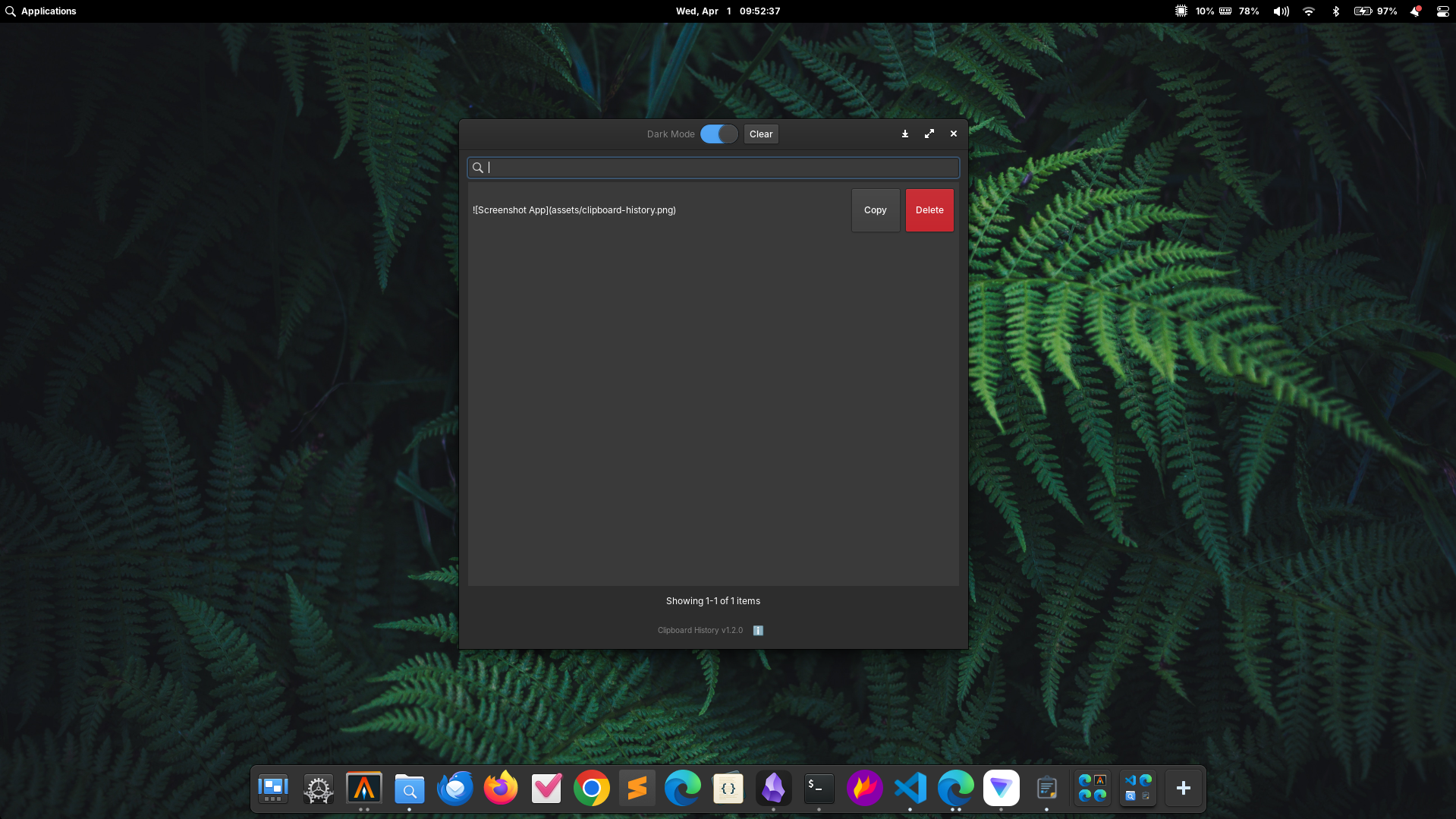
<p>Just open the app, find the text you want, and click to copy it again.</p>

<p><img src="/assets/screenshot-dark.png" alt="Screenshot App" /></p>

<h3 id="features-currently-available">Features Currently Available:</h3>

<ul>
  <li>Automatic clipboard monitoring</li>
  <li>Clipboard history</li>
  <li>Quick search</li>
  <li>One-click recopy</li>
  <li>Delete specific items</li>
  <li>Clear entire history</li>
  <li>Automatic history limit</li>
  <li>Light and simple GTK interface</li>
  <li>Autostart support on login</li>
</ul>

<h2 id="why-did-i-choose-vala">Why Did I Choose Vala?</h2>

<p>This might be an interesting question.</p>

<p>Many people choose Electron, Python, or even Rust for building Linux desktop applications.</p>

<p>But I chose Vala for several simple reasons:</p>

<ul>
  <li>Excellent GTK integration</li>
  <li>Lightweight</li>
  <li>Native Linux feel</li>
  <li>Fits well with the elementary OS ecosystem</li>
  <li>No need for a large runtime like Electron</li>
</ul>

<p>Besides that, I also wanted to learn something new while building an app I would actually use every day.</p>

<h2 id="ai-turned-out-to-be-very-helpful">AI Turned Out to Be Very Helpful</h2>

<p>One of the most interesting aspects of this project is that most of the development process was assisted by AI.</p>

<p>That doesn’t mean AI did everything automatically, of course.</p>

<p>I still had to understand the code structure, debug, fix bugs, set up the build system, package the <code>.deb</code>, and ensure the app worked as needed.</p>

<p>But AI helped accelerate the learning and experimentation process significantly.</p>

<p>Things that might have taken weeks to learn in the past could now be understood much faster.</p>

<h2 id="still-many-plans-ahead">Still Many Plans Ahead</h2>

<p>Currently, Clipboard History is at version 1.3 and is stable enough for daily use.</p>

<p>But there are still several features I want to add in the future, such as:</p>

<ul>
  <li>Wingpanel integration</li>
  <li>Popup clipboard similar to <code>Win + V</code> on Windows</li>
  <li>Image support</li>
  <li>SQLite storage</li>
  <li>Global keyboard shortcut</li>
  <li>Favorite (pinned) clipboard items</li>
</ul>

<h2 id="open-source-and-available-for-everyone">Open Source and Available for Everyone</h2>

<p>Since I built this project as a learning tool and as something I actually use myself, I’ve made the source code publicly available on GitHub.</p>

<p>So anyone can view the source code, provide feedback, or even contribute if they’re interested.</p>

<p>What matters most to me isn’t the number of GitHub stars or downloads, but the fact that as someone who isn’t a professional developer, I managed to build a Linux app that I actually use every single day.</p>

<p>And honestly? That feels pretty great.</p>

<p>Repository : https://github.com/gylangsatria/clipboard-history-elementaryos</p>]]></content><author><name>Gylang Satria</name></author><category term="linux" /><category term="elementary-os" /><summary type="html"><![CDATA[How I built a native clipboard history app for elementary OS using Vala, GTK3, and Granite — with a little help from AI.]]></summary><media:thumbnail xmlns:media="http://search.yahoo.com/mrss/" url="https://blog.gylang.my.id/" /><media:content medium="image" url="https://blog.gylang.my.id/" xmlns:media="http://search.yahoo.com/mrss/" /></entry><entry><title type="html">2026: A Year of Windows, Linux, Security, and Writing</title><link href="https://blog.gylang.my.id/2026/06/23/2026-a-year-of-windows-linux-security-and-writing.html" rel="alternate" type="text/html" title="2026: A Year of Windows, Linux, Security, and Writing" /><published>2026-06-23T00:00:00+00:00</published><updated>2026-06-23T00:00:00+00:00</updated><id>https://blog.gylang.my.id/2026/06/23/2026-a-year-of-windows-linux-security-and-writing</id><content type="html" xml:base="https://blog.gylang.my.id/2026/06/23/2026-a-year-of-windows-linux-security-and-writing.html"><![CDATA[<p>If there is one word that could describe 2026 for me so far, it might be “exploration.”</p>

<p>Not just exploration of new technology, but also exploration of how systems work, security, productivity, and how to deliver technical information to others through writing.</p>

<p>Throughout this year, I have learned and worked on quite a few things.</p>

<h2 id="diving-deeper-into-windows">Diving Deeper into Windows</h2>

<p>Windows remains one of my main focuses this year.</p>

<p>From following the development of Windows 11 25H2, discussing Windows 11 26H2, changes in Microsoft’s servicing branch, to various new features being tested through Windows Insider.</p>

<p>Interestingly, this year has also been when I increasingly understood how Microsoft is changing the way Windows is developed.</p>

<p>If in the past each year was marked by a major feature update, now most features arrive through monthly cumulative updates, while annual updates function more as enablement packages that simply activate features already present in the system.</p>

<p>This shift is quite interesting to follow because it indirectly changes how users perceive Windows updates.</p>

<h2 id="getting-back-to-linux">Getting Back to Linux</h2>

<p>Beyond Windows, Linux also remains an important part of my activities.</p>

<p>From Ubuntu, server management, SSH key usage, to various system administration tasks that are more comfortable to do through the terminal.</p>

<p>There is always something compelling about Linux—the freedom to understand what is actually happening behind the scenes.</p>

<p>Something that is sometimes less visible when using more closed operating systems.</p>

<h2 id="learning-and-facing-security-challenges">Learning and Facing Security Challenges</h2>

<p>This year has also been quite eventful with cybersecurity-related activities.</p>

<p>From log analysis, incident investigation using EDR, SentinelOne troubleshooting, to understanding various modern attack techniques like phishing, MFA fatigue, credential theft, and other evolving threats.</p>

<p>On the other hand, I have also increasingly realized that security is not just about technology.</p>

<p>Most problems often come from people, processes, and improper system usage habits.</p>

<h2 id="actively-writing-tech-content">Actively Writing Tech Content</h2>

<p>Perhaps one of the activities I have done most this year is writing.</p>

<p>I have spent a lot of time translating technology news from English into articles that are easier for Indonesian users to understand.</p>

<p>The topics are quite diverse:</p>

<ul>
  <li>Windows 11</li>
  <li>Microsoft Surface</li>
  <li>Copilot and AI</li>
  <li>Microsoft 365</li>
  <li>Linux</li>
  <li>Cybersecurity</li>
  <li>Hardware and PC devices</li>
</ul>

<p>Writing turns out to be not just about conveying information.</p>

<p>The more I write, the more I learn to understand a technology more deeply before explaining it to others.</p>

<h2 id="ai-is-everywhere">AI Is Everywhere</h2>

<p>It is hard to talk about 2026 without discussing AI.</p>

<p>Microsoft, Google, OpenAI, and almost all major technology companies are now racing to embed AI into their products.</p>

<p>Interestingly, I also often question whether all these AI integrations are truly necessary.</p>

<p>Because in some cases, users simply want devices that are fast, stable, and easy to use without overly aggressive AI features.</p>

<p>This debate will likely continue for years to come.</p>

<h2 id="still-much-to-learn">Still Much to Learn</h2>

<p>Although I have learned quite a lot this year, I feel the journey is still very long.</p>

<p>Technology changes too fast for anyone to feel truly done learning.</p>

<p>Every Windows update, every new security threat, every new device, and every AI development always presents something interesting to understand.</p>

<p>And perhaps that is why the world of technology never feels boring.</p>

<p>Because there is always something new to explore every day.</p>]]></content><author><name>Gylang Satria</name></author><category term="blog" /><category term="personal" /><summary type="html"><![CDATA[Reflections on exploring Windows, Linux, security challenges, and the joy of writing about technology in 2026.]]></summary><media:thumbnail xmlns:media="http://search.yahoo.com/mrss/" url="https://blog.gylang.my.id/" /><media:content medium="image" url="https://blog.gylang.my.id/" xmlns:media="http://search.yahoo.com/mrss/" /></entry><entry><title type="html">Welcome to My Personal Site</title><link href="https://blog.gylang.my.id/2025/08/30/introducing-my-blog-and-services.html" rel="alternate" type="text/html" title="Welcome to My Personal Site" /><published>2025-08-30T00:00:00+00:00</published><updated>2025-08-30T00:00:00+00:00</updated><id>https://blog.gylang.my.id/2025/08/30/introducing-my-blog-and-services</id><content type="html" xml:base="https://blog.gylang.my.id/2025/08/30/introducing-my-blog-and-services.html"><![CDATA[<p>Welcome to my personal site — a curated space where I document what works, what breaks, and what I learn along the way.</p>

<p>I’m <strong>Gylang Satria Yudha</strong>, a writer who enjoys tinkering with systems, breaking things down, and figuring out how they work. I write not just to explain, but to understand — and this site is where I share that process. Whether it’s server recovery, software quirks, or just thoughts on how things could be better, I document what I explore.</p>

<p>This site serves as a lightweight companion to my main technical blog and the services I occasionally offer.</p>

<h2 id="bloggylangmyid--field-notes--technical-experiments"><a href="https://blog.gylang.my.id">blog.gylang.my.id</a> — Field Notes &amp; Technical Experiments</h2>

<p>This is where I publish deeper documentation and real-world troubleshooting logs. Topics range from Linux server recovery and SLiMS module audits to UI refinement and workflow experiments.</p>

<p>A few recent posts:</p>

<ul>
  <li>Fixing Timeshift-gtk Not Launching on Linux</li>
  <li>Deploying SLiMS9 Bulian on Ubuntu Server 24.04 LTS</li>
  <li>Restoring a Hacked School Website</li>
</ul>

<p>The blog also offers free member access to exclusive content and templates.</p>

<h2 id="services--projects">Services &amp; Projects</h2>

<p>I focus on building maintainable, user-driven solutions with clear documentation. My current areas of interest include:</p>

<ul>
  <li><strong>Blocklist Automation</strong>: Converting raw text filters into validated Chrome JSON rules with deduplication</li>
  <li><strong>UI Feedback &amp; Documentation</strong>: Designing actionable, professional feedback systems for technical and non-technical users</li>
  <li><strong>SLiMS Debugging</strong>: Auditing PHP modules and SQL queries for library systems</li>
  <li><strong>Technical Writing</strong>: Producing SOPs, guides, and articles with precise terminology and immediate usability</li>
</ul>

<hr />

<p>I believe good documentation is not an afterthought — it’s the backbone of sustainable solutions.</p>

<p>If you’re curious, feel free to explore, contribute feedback, or reach out for collaboration.</p>

<p>This site (<a href="https://gylangsatria.github.io">gylangsatria.github.io</a>) will continue to host lighter updates, quick notes, and personal reflections alongside the main blog.</p>]]></content><author><name>Gylang Satria</name></author><category term="personal" /><category term="blog" /><summary type="html"><![CDATA[A curated space where I document what works, what breaks, and what I learn along the way.]]></summary><media:thumbnail xmlns:media="http://search.yahoo.com/mrss/" url="https://blog.gylang.my.id/" /><media:content medium="image" url="https://blog.gylang.my.id/" xmlns:media="http://search.yahoo.com/mrss/" /></entry></feed>